

The safest way to transfer a household calendar during a senior move is to create one verified master calendar before packing begins, then carry each recurring appointment, payment date, home task, social commitment, and care routine into the system the senior or caregiver will actually use. Keep the original calendar available until every entry has been reviewed, assigned to a person, and confirmed for the new home.
Quick answer: Photograph or copy the existing calendar, gather dates from paper notes and devices, sort each item by whether it moves, changes, or ends, and enter the verified information into one master calendar. Add a responsible person and contact details to important entries. Do not discard the old calendar until appointments, services, payments, and access permissions have been confirmed.
A calendar transfer is not merely copying dates. A move can change who provides transportation, where medications are collected, which household services remain relevant, and who receives reminders. The goal is to preserve the senior’s routines while preventing obsolete information from following them into the new residence.
Why does a senior’s calendar need a separate transfer plan?
A household calendar often functions as an informal operating record. It may contain medical appointments, birthdays, religious activities, payment reminders, trash days, maintenance visits, prescription pickup dates, and handwritten phone numbers. Some of this information may appear nowhere else.
Moving introduces three risks:
- A valid commitment is overlooked because it was written on a wall calendar that was packed.
- An old-house task remains active after the senior leaves.
- A relative, caregiver, or service provider assumes someone else is handling an appointment.
The calendar also carries personal preferences. A weekly lunch, regular phone call, or favorite community activity may matter as much to the senior’s stability as a practical home task. Those entries should not be treated as clutter simply because they are informal.
Calendar transfer fits within broader move coordination, but it should remain a distinct task with a named owner. Families considering hands-on coordination can review the statewide move management service to understand where practical move support may fit. The household should still decide who may view personal information and who has authority to make or change appointments.

Step 1: Capture every calendar source before changing anything
Start by preserving the current record. Take clear photographs or make copies of every month that contains upcoming dates, recurring notes, or contact information. Include the calendar cover if it identifies an organization, medical office, or service provider.
Then check for dates stored outside the main calendar:
- A pocket planner or purse calendar
- Notes attached to the refrigerator
- Appointment cards
- A medication log
- A family group calendar
- A phone, tablet, or computer calendar
- Email or text reminders
- Automatic payment notices
- Community, faith, or residence activity schedules
- Notes kept near a landline telephone
Do not combine or delete entries yet. First create a complete source set. If two calendars disagree, mark the conflict for verification instead of choosing the date that appears most recent.
This is also a useful point to separate calendar records from papers that need sorting. A practical cleanout or move team may discuss keeping calendar pages accessible and identifying documents that appear connected to upcoming tasks. The team should not decide whether financial, medical, contractual, or legal records may be destroyed. The document owner, authorized representative, attorney, financial professional, healthcare provider, or applicable authority should make those decisions.
If calendar recovery is happening alongside a larger property clearing project, the guide on how far in advance should i plan a move explains the broader cleanout sequence without treating personal scheduling decisions as disposal decisions.
Step 2: Build one master calendar
Choose a master format that matches the senior’s actual habits. A digital system is not automatically better. Someone who reliably checks a large paper calendar may be safer with paper, provided an authorized family member or caregiver has an appropriate backup.
Possible formats include:
- A paper wall calendar in the new home
- A dated planner
- A shared digital calendar
- A printed calendar generated from a digital system
- A combined system with paper for the senior and digital reminders for an authorized helper
For each entry, record more than the date. Include:
- What: The appointment, task, event, or deadline.
- When: The date and time, including arrival instructions if confirmed.
- Where: The complete address or whether it is by telephone or video.
- Who: The person attending and anyone responsible for assistance.
- Contact: A verified phone number or other appropriate contact method.
- Action: Transportation, documents, payment, preparation, or follow-up needed.
This six-part structure makes the calendar usable during the move. An entry that says only “doctor at 2” may not help a family member determine which office, how to get there, or whether paperwork is required.
Avoid placing sensitive account numbers, medical details, passwords, door codes, or full financial information on a calendar that visitors can see. Use a neutral prompt such as “bring blue folder,” then store the protected information appropriately.
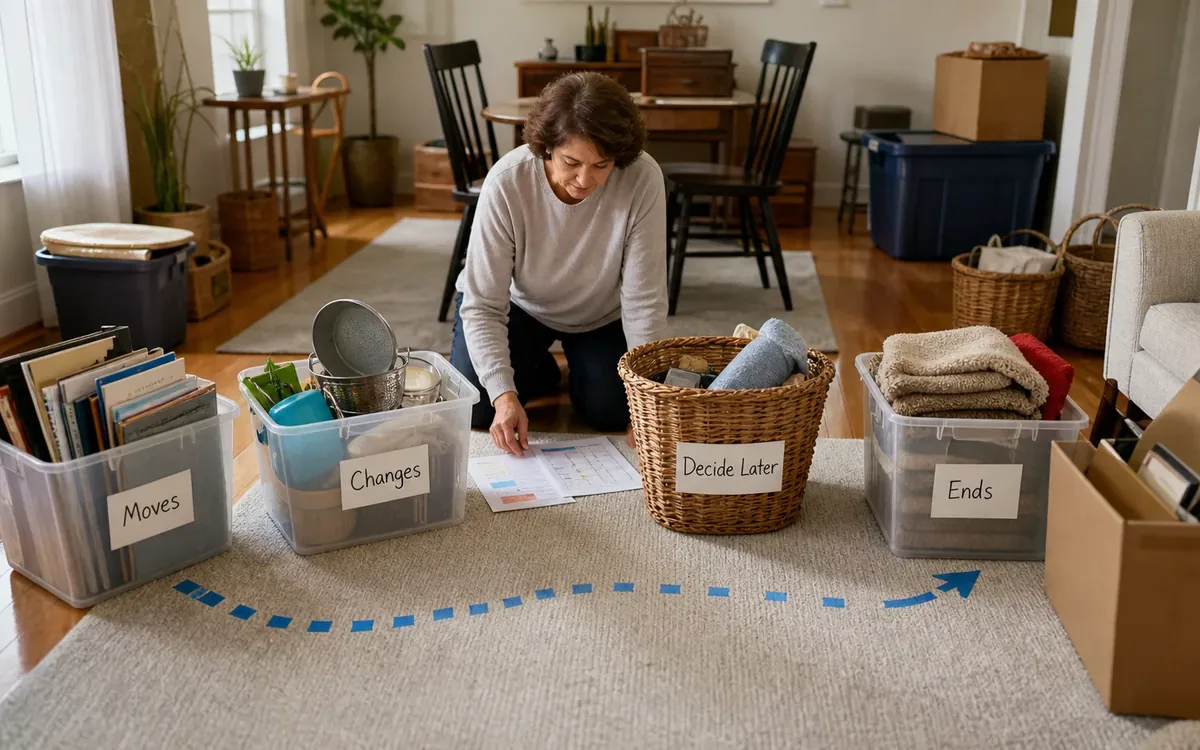
Step 3: Decide whether each entry moves, changes, or ends
Every calendar item should receive one of three statuses. This keeps obsolete home routines from being copied without review.
Moves unchanged
These are commitments that remain valid after the relocation. Examples may include a family birthday, a remote appointment, or an established social call. Confirm that the date and contact information are still current.
Changes because of the move
These items remain necessary but require a new place, provider, route, payer, or responsible person. They may include prescription pickup, transportation arrangements, recurring appointments, or household deliveries.
The household can identify preferences, contact providers, and decide who will handle follow-up if authorized. Only the relevant provider or responsible professional can confirm availability, acceptance, transfer requirements, and appointment details.
Ends with the old residence
Some reminders relate only to the former home. Examples may include lawn visits, neighborhood activities, recurring maintenance, or delivery instructions. Marking an entry “ends” does not itself cancel a contract or service. The account holder or authorized representative must contact the provider and follow the applicable cancellation terms.
Keep proof of cancellation or change outside the public-facing calendar. A private move file can hold confirmation messages and reference numbers.
Who should control the calendar during the move?
Name one calendar coordinator and one backup. The coordinator does not automatically gain authority over the senior’s healthcare, finances, property, or legal matters. This role simply prevents duplicate edits and missed follow-up.
The senior should remain involved to the extent they choose and are able. Ask which routines matter, how reminders should appear, and who may see the schedule. Do not assume that every relative needs access.
A useful division of responsibility may look like this:
- Senior: States preferences, identifies familiar routines, and approves access when able and authorized.
- Calendar coordinator: Consolidates entries, flags conflicts, and records confirmed changes.
- Family or caregiver: Handles tasks specifically assigned and permitted to them.
- Move team: May discuss practical move dates, packing access, delivery coordination, and placement of the calendar in the new home.
- Healthcare office: Confirms medical appointment details and its own patient-access requirements.
- Attorney or authorized legal representative: Addresses powers of attorney, estate authority, consent, or other legal questions.
- Financial institution or adviser: Explains its procedures for accounts, automatic payments, and authorized access.
A move company or cleanout team should not interpret legal authority, determine capacity, access protected accounts without authorization, or decide who may control the senior’s calendar. When authority is unclear, pause the disputed change and consult the appropriate professional.
Step 4: Connect calendar entries to the physical move
A strong calendar transfer links dates to objects and documents. If an appointment requires an insurance card, mobility device, identification, or medical paperwork, those items need to remain accessible rather than disappear into general packing.
Create a clearly labeled calendar kit containing only non-sensitive working materials, such as:
- The current calendar or copies
- The new master calendar
- Pens and removable notes
- A contact list
- A move-day schedule
- A list of entries awaiting confirmation
- Neutral reminders showing which private folder is needed
Keep protected documents in a secure location selected by the household or authorized representative. Do not place irreplaceable records, medication, payment cards, keys, or legal documents into an unattended open box.
A practical move team may discuss packing sequence, furniture placement, access paths, and where the calendar will be set up. Storage is a separate household decision involving the chosen storage provider and its terms. Contractor work is arranged with the relevant contractor. Appraisals are completed by qualified appraisal professionals selected by the responsible party. Disposal choices remain subject to household authorization and applicable facility rules.
What should be verified before the old calendar is retired?
Do not discard, recycle, or archive the original based only on successful data entry. Verification means checking important details with an appropriate source.
Review these categories:
- Appointments: Confirm date, time, location, and required preparation with the provider.
- Transportation: Confirm the driver, pickup point, destination, and mobility needs.
- Medications: Confirm refill or pickup arrangements through the pharmacy or healthcare professional.
- Payments: Confirm changes through the company or financial institution, not through a handwritten calendar note alone.
- Home services: Determine whether the service transfers, changes, or requires cancellation.
- Social routines: Ask the senior which activities should continue and whether transportation or registration changes.
- Move tasks: Confirm access, packing, closing, delivery, and key handoff details with the responsible parties.
Use a visible status next to each item: “confirmed,” “waiting,” or “action needed.” Avoid ambiguous marks that only one person understands.
The household can decide which nonbinding routines to preserve and who receives reminders. A move team may discuss practical scheduling and dependencies. Real-estate agents or brokers address listing and transaction matters within their roles. Inspectors report on the property within the scope of their inspections. Attorneys address legal rights and documents. Government offices and other applicable authorities make official compliance determinations.
Clutter Cleaner of South Carolina lists code compliance support among its services, but practical support does not replace a government determination, inspection, legal interpretation, permit decision, or contractor assessment.
Step 5: Test the new system in the new home
Place the paper calendar where the senior expects to find it, while considering privacy and safe access. If a digital calendar is used, check that the correct device is signed into the intended account and that notifications are understandable.
Run a simple test:
- Ask the senior or designated helper to locate the next important entry.
- Confirm they can identify the place, contact, and preparation needed.
- Test one reminder on each device that will be used.
- Check that authorized shared users can see updates.
- Remove access from people who no longer need it, following the platform’s procedures.
This five-step test reveals practical gaps. Tiny print, unclear abbreviations, excessive alerts, or duplicate notifications can make an otherwise complete calendar difficult to use.
Keep the source calendar securely for a period chosen by the household or responsible professional based on privacy, recordkeeping, and legal needs. Do not state a universal destruction date. Requirements can vary according to the type of information and the person’s circumstances.
Common calendar-transfer mistakes to avoid
Several errors can undermine an accurate-looking calendar:
- Packing the only calendar before copying it
- Entering dates without addresses or phone numbers
- Assuming a recurring service will transfer automatically
- Giving broad digital access without the senior’s permission or proper authority
- Canceling appointments merely because transportation is uncertain
- Copying old-house maintenance reminders into the new-home calendar
- Writing passwords or sensitive account data on a wall calendar
- Treating an unconfirmed family promise as a transportation plan
- Discarding appointment cards before conflicts are resolved
- Allowing several people to edit without a coordinator
The better approach is to flag uncertainty. “Call office to confirm” is safer than presenting an unverified date as settled.
FAQ
Should the senior use paper or a digital calendar?
Use the format the senior can reliably understand and access. A combined system may work when the senior prefers paper but an authorized helper needs digital reminders. Privacy, account control, and ease of correction should guide the choice.
Can a move team change medical or financial appointments?
A practical move team may help identify scheduling conflicts or discuss move logistics. Changes involving healthcare or financial matters should be made by the senior or a properly authorized person under the provider’s procedures.
What happens to reminders tied to the old house?
Classify each as ending, transferring, or requiring confirmation. A calendar notation does not cancel a service agreement. Contact the provider and retain any confirmation according to the household’s recordkeeping plan.
Where should the original calendar be kept?
Store it securely with the move records until the household or responsible professional determines it is no longer needed. Protect any personal, medical, financial, or access information it contains.
A focused next step
Before packing the calendar, choose its coordinator, photograph every used page, and create the three status labels: moves, changes, and ends. That small structure turns scattered dates into an accountable transition record.
For a South Carolina move, Clutter Cleaner of South Carolina has a physical business location in Mount Pleasant and serves households statewide, with Charleston as its primary market. The team may discuss practical move management, downsizing and organizing, estate cleanouts, auctions and estate sales, home sale preparation, and code compliance support as applicable. Legal authority, appraisals, real-estate representation, inspections, contractor determinations, storage contracts, disposal acceptance, and official compliance decisions remain with the household and the relevant providers, professionals, facilities, or authorities.